Make money with Chrome extensions. Let AI write the code.
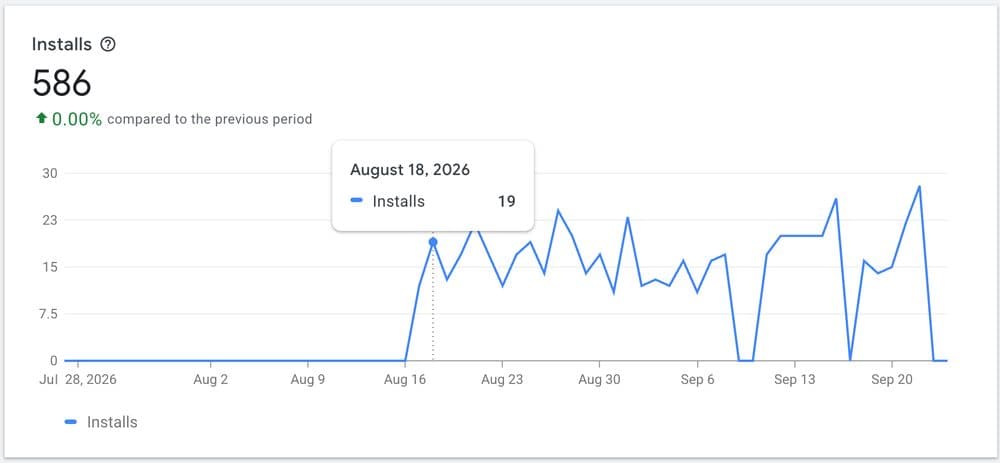
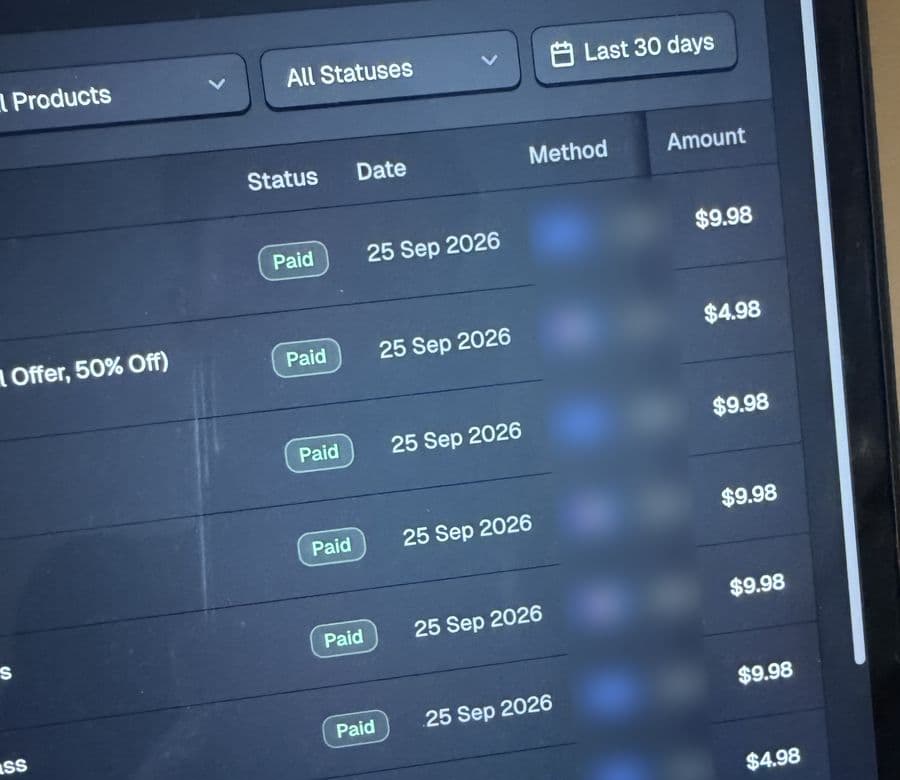
My last extension took 4 hours to build with AI. Five days later a stranger paid for it.
- An extension worth building
- AI that builds it
- A plan to get it found
- 5M+installs since 2018, 2 extensions past 100k weekly users
- $100k+from selling 8 Chrome extensions I built myself
- $0spent on marketing
Why the Chrome Web Store is still a gap in the market
Mobile got crowded. The Chrome Web Store still sends users to whoever builds what people search for. Here's what I mean, on my own extensions.

Small extensions. Real money.
I sold my first extension at 19. Since then I've built and sold eight, for more than $100,000 in total — without spending a dollar on marketing.
Color Picker
- Effort
- 3 days of work
- Result
- 100,000 weekly users
Sold for $20,000
Tab volume control
- Effort
- Built it twice
- Result
- 30k, then 100k users
Sold both versions
My latest, built with AI
- Effort
- 4 hours of work
- Result
- No audience, no ads
First sale on day 5
Build and submit your first paid Chrome extension in one weekend.
What took me 8 years, in three steps. AI writes the code. One payment, instant access, yours to keep.
The weekend, with Essential or above:
- Friday evening
Run the 90-minute sprint. Pick your extension.
- Saturday
Build it with the AI Kit.
- Sunday
Write the store listing with AI and submit it.
Working with me 1-on-1 until your first sale is $2,999. Or do it yourself, from $99:
- Minimum
$99
Just the playbooks: what to build and how to get it found. No AI Kit.
- EssentialBest value
$249
The whole system. You direct, AI builds.
- Included: Pick an idea people already search for, and how it paysFind & Monetize playbook
- Included: AI writes the extension and its store listing for youExtension AI Kit for Claude Code & Codex
- Included: Get found in store search without paying for adsOrganic Growth playbook
- Not included: Choose the idea together before you build60-minute strategy call with me
- Strategy
$499
Essential, plus an hour with me before you build.
I review your store listing
$100 valuePersonally, on WhatsApp, before you submit. Early bird: the first buyers each month.
The full build, on video
An extension built and published start to finish. It got 100 installs in its first week.
Listing reviews go to the first 10 paid orders each calendar month.
The Unstuck Promise. Stuck on any step in your first 60 days? Message me on WhatsApp and I'll get you moving again. Every plan, no extra charge.
Not sure which one? Ask me first.I answer every WhatsApp message myself — and I'll tell you if none fits →- ✓ Instant access after payment
- ✓ Future updates included
- ✓ Secure checkout by Stripe
I work with you until your extension makes its first sale.
We pick the idea together, I review every step, and you message me whenever you are stuck. If it doesn't sell and you did the work, you get your money back.
- Everything in Essential
- Strategy call to choose the extension and the plan
- Direct support on WhatsApp until your first sale
- I review your idea, your build and your store listing
- First sale within 30 days of going live, or your money back
$2,999
one-time · money-back guaranteeApply for a spot on WhatsApp →No sale within 30 days of going live, and you did the work? Full refund. Conditions
One-time payments in USD. Minimum, Essential and Strategy are final sales. My results are my own; yours depend on your idea, your product and your effort — see the earnings disclaimer.
8 years of trial and error, written down
One product for each step: find the extension, build it with AI, grow it in store search. Checklists, scorecards and step-by-step plans — no fluff.
- 01 / Find · Monetize
Find & Monetize
Choose an extension worth building, and decide how it will pay.
A Color Picker I built in 3 days sold for $20,000. This is how I pick ideas like that.
- The 100-point decision gate
- Four monetization paths
- What makes an extension valuable to a buyer
- The 90-minute opportunity sprint
In every plan
Claude Code · Codex
› /create-extension
› /health
› /extension-marketing
Interviewing you before building…
02 / Build with AIExtension AI Kit
Turns Claude Code or Codex into your extension developer.
My last extension took 4 hours. Code is no longer the hard part.
- /create-extension
Interviews you, agrees a plan, then builds and verifies the extension. - /health
Checks store readiness and product health before you submit. - /extension-marketing
Writes your whole store listing — name, descriptions, promo tile and screenshots — ready to submit.
In Essential and above
- /create-extension
- 03 / Grow
Organic Growth
Get found in Chrome Web Store search — and keep getting found, without ads.
One change roughly tripled installs on one of my extensions — no new features, no ads. Chapter 1 shows what it was.
- What actually moved my traffic
- Write the name and descriptions
- Run a listing experiment
- The 30-day organic growth rollout
In every plan


Questions people ask before buying
- I'm not a developer. Can I still do this?
- Yes. The AI Kit turns Claude Code or Codex into your extension developer: it scopes, builds, checks and prepares the listing. You describe what you want, test what it builds and make the decisions. You don't write the code.
- What does it cost besides the plan?
- A one-time $5 Chrome Web Store developer fee and an AI coding tool — Claude Code or Codex, about $20 a month. No ads. I have never paid for marketing.
- How soon can I make money?
- It depends on what you build and how well it ranks. My last extension made its first sale on day five; my Color Picker grew for a year before I sold it. The plans teach you to start where demand already exists, so you are not waiting on luck.
- What if I get stuck?
- Message me on WhatsApp. For your first 60 days, whichever plan you bought, I'll get you moving again. That's the Unstuck Promise, and it costs nothing extra.
- What exactly do I get, and when?
- Instant access after payment. The two playbooks (PDF) and the AI Kit download from your library, and future updates are included. The first 10 buyers each month also get their store listing reviewed by me. Strategy and Maximum calls are booked with me on WhatsApp.
- Which plan should I pick?
- Essential if you want to do it yourself — it is the whole system. Strategy if you want me to check your idea before you spend weeks on it. Maximum if you want me beside you until the first sale. Minimum if you only want to read how it works first.
- Who is this not for?
- Anyone who wants money without shipping anything, or plans to buy users with ads. You need a few focused evenings a week to follow the steps and test what AI builds. If you want someone beside you the whole way, that is what Maximum is for.
- Is income guaranteed?
- No plan guarantees income. Minimum, Essential and Strategy come with the Unstuck Promise instead of a refund. Maximum comes with a refund promise: if you do the agreed work and the extension makes no sale within 30 days of going live, you get your money back.
- I bought a product before the plans. What happens to it?
- Nothing changes. Everything you bought stays in your library, with future updates.
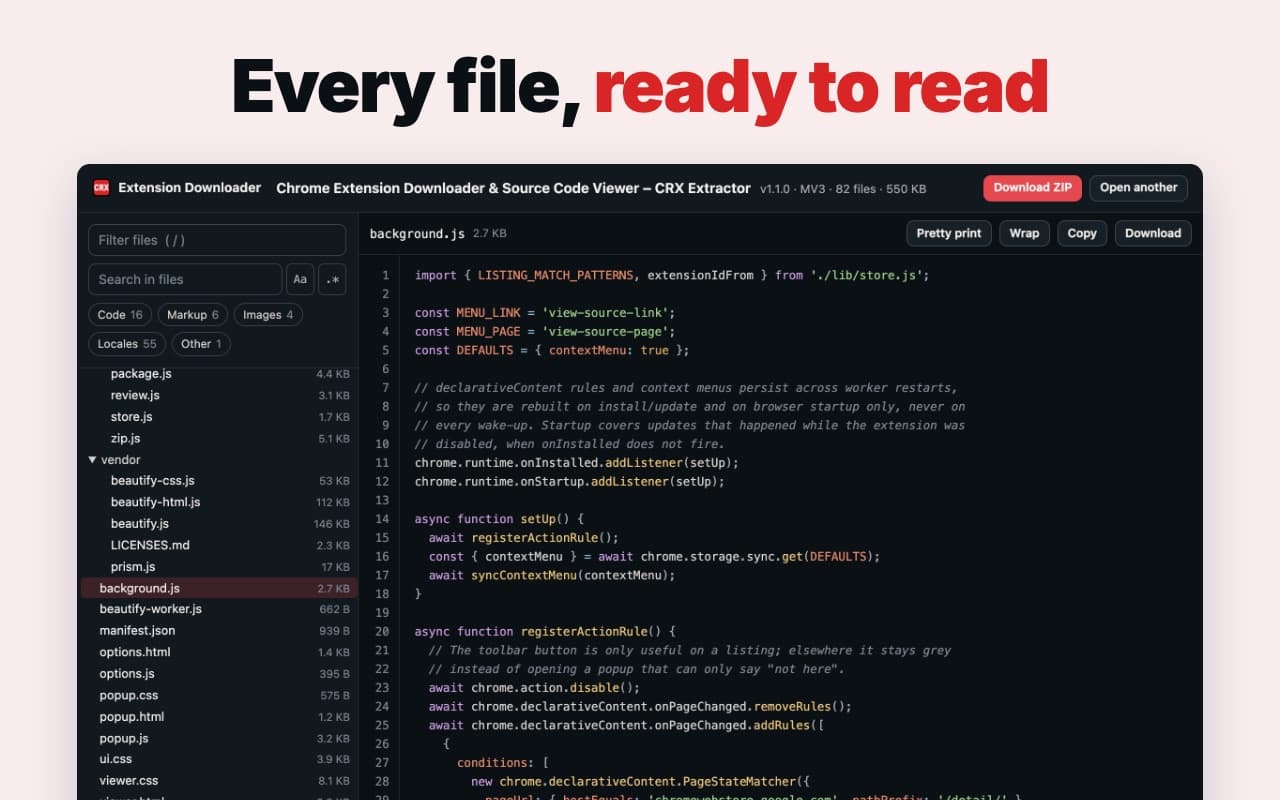
See inside any extension before you build yours
Read the source of any extension in the Chrome Web Store, or download it as a ZIP. How it works
Chrome extensions install on a computer, not a phone. Open ext.verblike.com/tools/extension-downloader there.
Watch me build and publish an extension. It got 100 installs in its first week.
The whole thing on camera, start to finish, no ads. I'll email you the link.